
Category: problem

  • Jenkins rebuild old build – by git commit

    Jenkins rebuild old build – by git commit

    Problem

    Jenkins is a great tool for automation server, with a huge number of available plugins. As such it is sometimes hard to find the right one. As I navigated across the sea of automation, there was always a concern -> How do we restore a previous build if the current build completes, but the deployed version has a non-expected error.

    Setting up a rebuild scenario in Jenkins brought to life a new dimension issues I was not expecting.

    Solution

    I completed the requirement by using the Rebuild plugin which adds a nice rebuild button to all the old builds. Got to the plugins page and check for Rebuild plugin. Restart Jenkins afterward just so we are sure everything is picked up correctly. The button to rebuild will be present in the old build details in every project. Rebuild will trigger the build with  same configuration as the original build was build with. The issue is that when using a versioning system (like GIT), the configuration stays the same. In my case it was still building the latest commit to the repository as the project was configured to get the latest version.

    The solution is to set a string parameter to your job. I set my parameter default value to develop as if no parameter is specified to I want to download the latest version of the develop branch.

    String parameter:

    • Name: COMMIT
    • Default value: develop

    Branches to build set to value: ${COMMIT}.

    Afterward I can run a Build  with Parameters and input a git revision of a previous build.

    To rebuild using old code check the old job details (revision number):

    then go to the project and press Build with parameters button.

    Paste the git revision in the input field and lunch the build.

    This way Jenkins builds (and deploys if configured) the current application with the requested revision from GIT.

    Hope it help anyone.
  • Editing Word 2013 Table of Content

    Editing Word 2013 Table of Content

    Table of content
    Table of content for images
    Table of contents is build upon styles that are present in the text. Usually direct modification on a word or two are preserved even if the style for a paragraph changes.

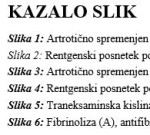
    This phenomena can also be spotted when building table of contents for images or graphs. If your table of contents has some “Graph 1” bold and, lets say, “Graph 2” not bold, but in the text lower they are both bold, then styles kicked in. As you can see in the picture – “Slika 2” has a style of Heading 1 and it appears different from “Slike 1” which has style Caption. You should go to the caption text of “Graph 2”, mark the whole line and remove all styles. (Thus removing Heading 1)

    Then apply the changes you wish to have in the table of contents.

    Refreshing the ToC should pick up your custom formatting.

    ps: You should set up ToC properties when creating them. Afterwards modifications like line spacing or paragraph spacing cannot me made.

  • Avast residues

    Avast is a really nice antivirus program with friendly user interface and easy setup.

    While it works efficiently, it amazed me that it has a really harsh internet firewall that you don’t even know it works. It occurred to me many times that it had something to do with playing lan games using old Hamachi. We could see the server hosted on the pc behind avast, but we could not connect to it. It would just start connecting forever and never coming to a point. Uninstallation of Avast resolved the problem immediately so we knew something was up wit hit. Later it showed up that even disabling only the firewall part worked well.

    The new story that amazed me was also related to avast. The program itself was uninstalled, but a service remained running in the background. Even after many computer restarts. The user could connect everywhere outside but nobody could connect to him. We tried with TeamViewer – no go (
    Error Code: WaitForConnectFailed ), Remote deskotp – didnt work (stalled at initializing … ), RealVNC didn’t work. Any connection to the user pc was failing. We noticed the problem because the user could not connect to an OpenVPN server, probably because the server wasn’t able to make a connection to the user. Firewall were disabled at all.

    Then I notice an avast service running in task manager and it came to my mind that it shouldn’t be there as Avast was previously uninstalled. The avast process could not be killed as the administrator didn’t have enough rights (right! clear as the sky on a rainy day). Fortunately Avast provides the right tool with clear instructions on how to remove it. The process is described at http://www.avast.com/uninstall-utility and easy to follow if you know what safe mode is.

    After removal everything started working normally again.