Category: Splošno

  • Oracle SQL Developer and SIGBUS, Non-existent physical address

    For quite some time I could not find the reason behind SQL Developer not opening the java folder. As soon as trying to open it it went crazy. Connections would be reconnected on each mouse click in the tree -> tables, packages, procedures ….

    Sql developer java folder

    Finally I noticed in alert log an error started popping up. It reads like this:

    xxx(3):Exception [type: SIGBUS, Non-existent physical address] [ADDR:0x401FC8000000] [PC:0x10F340C, ksm_mga_heap_alloc_seg()+140] [flags: 0x0, count: 1]
    Errors in file /u01/app/oracle/diag/rdbms/xxx1/xxx/trace/xxx_ora_189996.trc (incident=22001) (PDBNAME=xxx):
    ORA-07445: exception encountered: core dump [ksm_mga_heap_alloc_seg()+140] [SIGBUS] [ADDR:0x401FC8000000] [PC:0x10F340C] [Non-existent physical address] []
    PCHDUAT(3):Use ADRCI or Support Workbench to package the incident.
    See Note 411.1 at My Oracle Support for error and packaging details.

    Searching the internet did not reveal much information except something similar. The proposed solution was to increase the /dev/shm space to at lease the size larger than the value of SGA_MAX_SIZE, if set, or should be set to be at least MEMORY_TARGET or MEMORY_MAX_TARGET, whichever is larger.

    A simple command for temporary increase provided immediate resolution without even a database bounce.
    In my case the memory was set to 11GB so 12GB shm would suffice:

    mount -o remount,size=12G /dev/shm

    This error was present from version of oracle database 11 onwards and it was still happening on version 19.11.

    Related oracle article: https://support.oracle.com/epmos/faces/DocumentDisplay?_afrLoop=201141489940754&id=1585946.1&_afrWindowMode=0&_adf.ctrl-state=pvop9ect3_102 (title: ORA-07445: [KCBHFHO()+49] [SIGBUS] [NON-EXISTENT PHYSICAL ADDRESS] (Doc ID 1585946.1))

  • Windows 10 updates stuck

    Windows 10 update system sometimes doesn’t work as expected, windows update get stuck downloading or checking for updates. There are multiple reasons that cause windows Update to stuck downloading or fail to install. This solutions you may help you fix and install windows update successfully.

    After days of desperate search I found the same solution over and over again. Only when I found the update logs I could identify what the real problem was. The Download mode setting saved me and windows updates started installing updates again. This setting also made Windows Store work again.

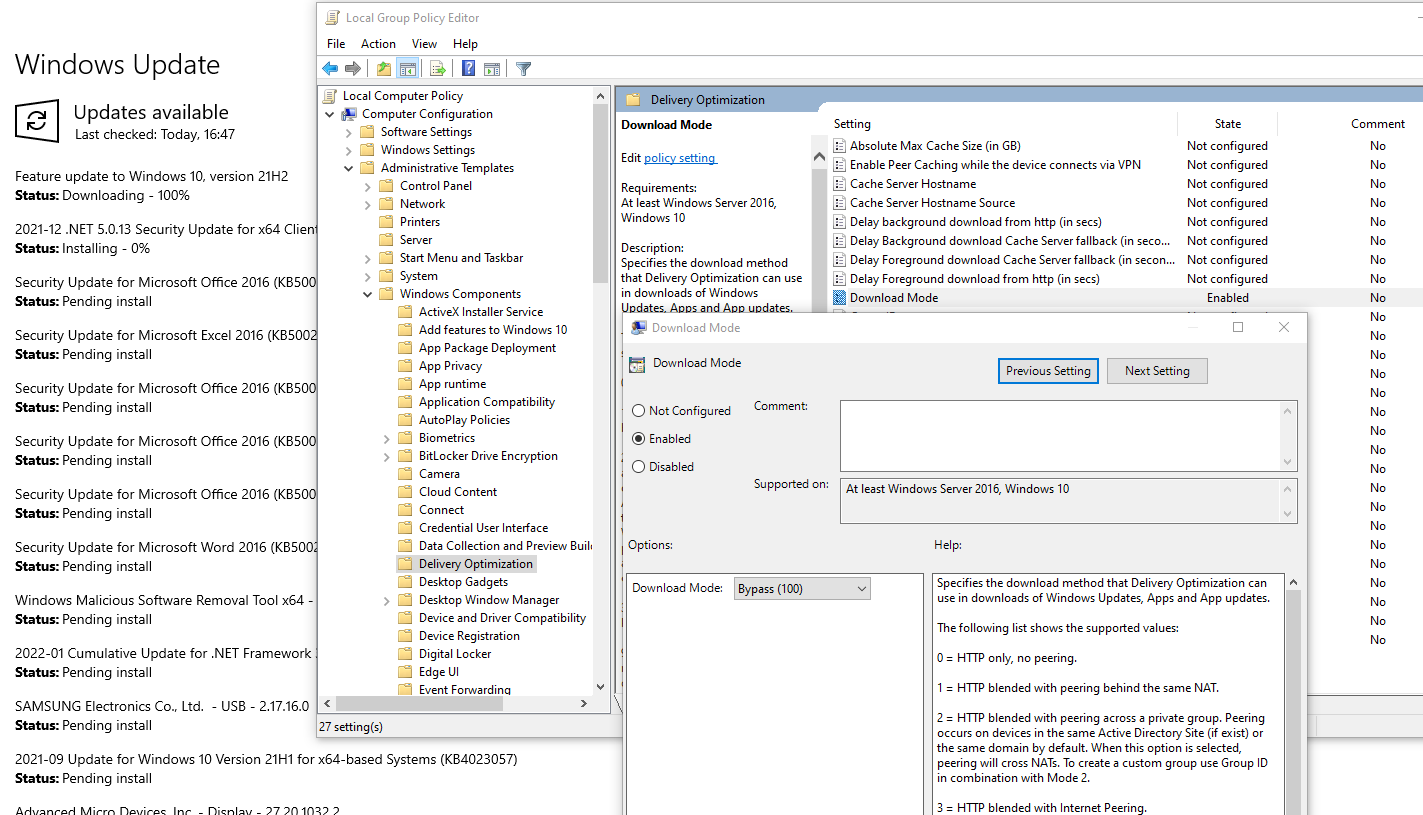
    To check your download mode setting open group policy editor and follow the path:
    Group policy editor -> Local Computer Policy -> Computer Configuration -> Administrative Templates -> Windows Components -> Delivery Optimization -> Download mode -> Set to 100 (Bypass)

    Download mode setting

    The powershell command to extract Windows update logs from .etl files is:
    Get-WindowsUpdateLog

    Log section with error

    Found: DO job {….} hit a transient error in the log file. DO stands for delivery optimization.
    And in the logs you may as well find the issue for your situation

    Other useful steps you can take to help you with windows updates issues:

    1. Run the Windows Update Troubleshooter from Windows Settings > Update & Security > Troubleshoot. 
    2. Rename or delete SoftwareDistribution and Catroot2 folders with following commands in command prompt with elevated privileges:
      net stop wuauserv
      net stop cryptSvc
      net stop bits
      Ren C:\Windows\SoftwareDistribution SoftwareDistribution.old
      Ren C:\Windows\System32\catroot2 Catroot2.old
      net start wuauserv
      net start cryptSvc
      net start bits


      DISM /Online /Cleanup-Image /RestoreHealth
      sfc /scannow

      wsreset.exe

    Connected error codes:
    0x80D03805
    0x8024001E
    0x80248014

  • Cntlm gateway mode setup for docker

    Cntlm gateway mode setup for docker

    In CNTLM we need to allow Gateway mode to allow other computers to connect trough our proxy. We used this in our corporate environment to allow docker images to be pulled from the web as docker does not have a nice way to hange proxies with NTLM authentication.

    We changed cntlm.ini around line 70.

    Uncommented Gateway flag

    # Enable to allow access from other computers
    #
    Gateway yes
    

    And for additional security specify specified who is allowed to connect to our proxy.

    # Useful in Gateway mode to allow/restrict certain IPs
    # Specifiy individual IPs or subnets one rule per line.
    #
    Allow 10.10.10.1
    Allow 127.0.0.1
    Allow 10.0.75.0/24
    Deny 0/0
    

    Be careful as docker for windows (not talking about docker toolbox) is not running under localhost, but its running in its own vhost environment. This means that you must specify the proxy in docker as http://10.10.10.1:3128/ and not use localhost or 127.0.0.1.

    Have a nice day.

  • Visual studio project configuration file settings priority

    csproj in explorerTHE PROBLEM
    For multiple versions (Dev, Test, Prod) of a single ClickOnce application one has to name assemblies differently. In this way you can have all three versions on the same computer. This can be easily achieved by using configuration in Visual Studio. The problem I had was that no matter what the assembly name I specified in the configuration, it would not use it during build.

    SOLUTION
    The problem was hidden on the bottom of the “application.csproj” file. All the properties of each configuration were placed on top of the csproj file and the bottom parameter was always setting like a default value.

     
    .
    .
    .
    <PropertyGroup Condition="'$(Configuration)|$(Platform)' == 'Release|AnyCPU'">
       <OutputPath>bin\Release\</OutputPath>
       <DefineConstants>TRACE</DefineConstants>
       <Optimize>true</Optimize>
       <DebugType>pdbonly</DebugType>
       <PlatformTarget>AnyCPU</PlatformTarget>
       <ErrorReport>prompt</ErrorReport>
       <CodeAnalysisIgnoreBuiltInRules>false</CodeAnalysisIgnoreBuiltInRules>
       <AssemblyName>Application Test</AssemblyName>
       <ProductName>Application Test</ProductName>
       <InstallUrl>https://localhost/install/</InstallUrl>
       <PublishUrl>C:\Deploy\</PublishUrl>
       <UseVSHostingProcess>false</UseVSHostingProcess>
    </PropertyGroup>
    .
    .
    .
    <PropertyGroup>
       <AssemblyName>Application</AssemblyName>
    </PropertyGroup>
    .
    .
    .
    

    Just remove the bottom PropertyGroup and your configuration setting will be applied at build time. Don’t forget to always reload the project when you change the configuration file, as visual studio always reads it only at project load.

    PS: To edit the csproj you must first unload the project. Then you can right click on it and choose edit. (or use a text editor in explorer)

  • Check your e-mail and username

    By: DonkeyHotey
    By: DonkeyHotey

    There is a site where you can check if your email or username or domain had been compromised in any of the security breaches or “pastes” in the past (public display of personal data).

    The site is reachable on this address:

    https://haveibeenpwned.com/

  • Sitecom WLR-5100 firmware v3.0

    390x295For all of those that cannot access the new firmware (v3.0) for WLR-5100 (X5 N600) I give you the link that I received from official support.

    WLR-5100 V1 001: www.service-downloads.com/data/files/Sitecom/WLR-5100v1-001-FW3.0.zip
    WLR-5100 V1 002: www.service-downloads.com/data/files/Sitecom/WLR-5100v1002-V1.2.zip

    This download will be available on their website when they update it. If the links don’t work you can always contact Sitecom’s support.

    I’ve been using the router for about a week now and I am satisfied with the functionality it provides.
    + 2,4 GHz and 5GHz wireless
    + Gigabit LAN (100+ MB/s tested)
    + IPv6 out of the box support
    + Wireless guest network on both frequencies

    – Could not find DLNA integrated server that was mentioned in description
    – no WDS
    – rare information about the inside of the router

    Have a nice day.

  • Use iText 5.4.x to signing a PDF file

    Here is a sample code to sign a PDF using iTextSharp library and it is using a certificate file (with private key).

    X509Certificate2 cert = new X509Certificate2("C:\\mycert.p12");
    
    Org.BouncyCastle.X509.X509CertificateParser cp = new Org.BouncyCastle.X509.X509CertificateParser();
    Org.BouncyCastle.X509.X509Certificate[] chain = new Org.BouncyCastle.X509.X509Certificate[] {
    cp.ReadCertificate(cert.RawData)};
    
    IExternalSignature externalSignature = new X509Certificate2Signature(cert, "SHA-1");
    
    PdfReader pdfReader = new PdfReader("C:\\multi-page-test.pdf");
    
    var signedPdf = new FileStream("C:\\multi-page-test-signed.pdf", FileMode.Create);
    
    var pdfStamper = PdfStamper.CreateSignature(pdfReader, signedPdf, '\0');
    PdfSignatureAppearance signatureAppearance = pdfStamper.SignatureAppearance;
    
    signatureAppearance.SignatureGraphic = Image.GetInstance("C:\\logo.png");
    signatureAppearance.Reason = "Because i can";
    signatureAppearance.Location = "Tu podpišem";
    signatureAppearance.SetVisibleSignature(new Rectangle(100, 100, 250, 150), pdfReader.NumberOfPages, "Signature");
    signatureAppearance.SignatureRenderingMode = PdfSignatureAppearance.RenderingMode.GRAPHIC_AND_DESCRIPTION;
    
    MakeSignature.SignDetached(signatureAppearance, externalSignature, chain, null, null, null, 0, CryptoStandard.CMS);
    
  • Extract integer serial from x509SerialNumber hex in certificate

    The important thing here is to trim leading zeros that serve just for filling data into byte octets.

    04CF = 4CF
    4CF(hex) = 1231 (int)

    Accessing the certificate serial number can be done in many ways. This is just an example.

    //Load certificate
    X509Certificate2 _certificate = new X509Certificate2("C:\mycert.p12");
    
    //Extract serial number and trim leading zeros
    String serialHex = _certificate.SerialNumber.TrimStart('0');
    
    //Convert from hex to integer (im converting it also to string)
    String serialInteger = int.Parse(serialHex, NumberStyles.HexNumber).ToString();
    
  • Must have WP plugins

    W3 Total Cache
    Plugin designed to cache and speed up your wordpress blog. With loads of setting you can minify css, cache pages, object, database, … You can even use Cloudflare for CDN.

    Smush.it
    A plugin for smashing (compressing) you pictures to the minimum size, but witouth loose of quality.

    WP Socializer
    Social networking integrated on every page and article of your blog. Lots of sites included.

    GTmetrix
    Speed analyzer of your blog with great suggestion on how to improve it.

    Lazy load
    Beautifully loading pictures when they are displayed in a visitors browser. Saves bandwith.
    Loads of other plugins are available at wordpress and this is just a bit I use. Highly recommended.

  • Snippet for Ctrl-A Shortcut To Select All Text (Windows.Forms.TextBox)

    Set this event handler for your textbox to enable Ctrl-A shortcut and select all text:

    private void anyTextBox_KeyPress(object sender, System.Windows.Forms.KeyPressEventArgs e)
    {
    if (e.KeyChar == '\x1')
    {
    ((TextBox)sender).SelectAll();
    e.Handled = true;
    }
    }

    Thanks to:
    http://www.dzone.com/snippets/ctrl-shortcut-select-all-text